Posts

New Control Point Insignia released 19.4.2017

Image
Its All about the CP :-) Not really this insignia has some awesome rally boosts too. The Control Point insignia II was released on 19/04 and o my what nice big boosts it has. Now remember insignia has to be equipped and active on your memorial and also has a cool down period before you can reactivate that same insignia. So if your planning to hold a Cp for hours on end stock up on some of them. Or remember to hit activate when a rally is set on a Cp or a few minutes before marching. They also have wicked rally boosts here are their boosts:
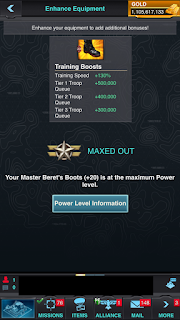
New Training Gear

Image
Train Train and some more Training New Captains Training gear has been released with a red beret and some serious boots to whip your troops in shape. Whats nice about this gear is that over and above the speed that is added when using this gear and a commander tree set to training and troop Que it also has a larger troop Que added per tier type of troops. Thus you can train more and faster awesome gear to have. Remember to combine this with a troop insignia and ask a Alliance member to add additional troop training speed to your training regimen. The team members help can shave off a lot of speed ups especially if your training 10 Bil troops at a time. Here is what the gear looks like and boosts applicable.

Augments - Weapon Attachments

Image
Augments - Weapon Attachments Well no gun is complete without sights, scopes, a decent stock and a mean silencer. That's basically what Augments is in the game. The augments work as two parts. 1 - Augment research in the research center. You will need to complete the research to be able to place the augments on to the weapon. 2 - Attach the augments that you received in the packs, there are both defensive and attack augments. Usually the newest augments are advertised in the blog. To open them you need to open the augment in your items under crates. To attach them you need to go to the gear, click on commander, click on the weapons and find the weapon that you wish to augment. Click install top right click on Augments. it will open a picture tap on each block and add the item. Remember to add them as a set

Modset Presets how to set them up

Image
Mod-set Presets for your commander Mod-set bonus is a type of research that will gain additional boosts from you mod-sets. Like a deck of cards some things just work better when put together. The commanders gear can hold 4 mods. Three square and one round mod. You will need to complete the full manufacturing research tree for you to be able to insert all four mods. We use to manually place mods and no one was more glad when Mobile Strike released the VIP levels that unlocked modest presets From level 122 you can remove mods for free from your gear and as the levels go up you can also unlock mod-set presets this makes building gear so much easier. Click on your commander, click on any gear item to open up the inventory. Find the item that you want to place your new modset on. Ps. Remember that the mod-set you have bought from either the black market (discussed earlier in the blog) or that you've won in challenges or bought via packs can be found under your items and crates. ...

Commander Skill Trees and how to set them

Image
Commander Skill Tree In the blog I've talked about setting your commander skill tree and presets. To set up your presets click top left corner on your commanders picture. To open the presets you'll need to complete some or all of the battle tactics presets and some additional is in the commander research. Click on the commander and click on the preset drop down box, click open presets. It will open  blank preset with no gear in. Add your specific gear that you are setting up and allocate the skill points. After adding your gear to the preset item click on the commander picture beneath the gear. It will open the commander skill tree on how your commander skills are applied. This can add massive amounts of attack, defense or shave off large amounts on research and construction. Always allocate from the bottom to the top of the skill tree. To get more points you will have to upgrade your commander. For instance research with research gear insignia's and boosts: ...

Troop Academy

Image
Troops Going Back to School Lets be honest who of us did not laugh thinking of big bad army clad troops going back to school. But it is way cheaper sending your lower tier troops to the academy and promoting those troops than training them from scratch. To upgrade the building and to unlock troops you'll require various badges for T5 normal, Advance and Merc and T6 troops. Additionally for T6 combat you will required manuals to complete the research. To use the the troop academy open the building, tap on the troop you want to promote then tap on the troop you want to promote to. You can promote a troop one tier up to any type of troop one tier up. To receive the max benefit of this building use the training gear on your commander with a commander set to troop training, add training insignia's and a troop boost under your additional boosts. As always when promoting large amounts of troops please check your nerf count (posted earlier on blog)

The speedup building what it does

Image
Speedup building in base To be honest not my favorite building but only because much later in the game when excessively large speedups are needed you wont use the building much. The building is in the top left hand corner of your base and is worth it when you've just started playing. Like the gold investment building you deposit the pesky small speedups and they grow over a investment time. Good to keep it running because you will always need speed ups.